Sunday, April 20, 2008

What Should I Use - PCLinuxOS or Windows XP or Mac OSX?

should i use windowsxp, pclinuxos or mac osxSome previous Windows users claim to have tried Linux and found it to be not suitable them. Even some long time Linux users tell that it's not good. However, some others are fanatic about Linux - they would go out of their way to help new linux users and love to create a propaganda for their pet OS.

So, what's the real thing, which OS is better, more advanced and powerful? Is linux preferrable to windows, or vice versa, or is Mac OS the best of all?

5 years back it was really tough for me to work on Linux, Red Hat 9. It was difficult for me to solve Linux annoyances by searching Google. I could not find something that directly applied to my problems. However, the past 5 year taught me enough, and during this period Linux has also advanced leaps and bounds in terms of usability, technology and performance.

In my initial years I had to work on Linux due to compulsion though and I could not find it to be prepackaged like Windows. Linux did not seem that straight forward thing. Terms like mount, fstab, su, chown and init seemed alien. Over the time I developed that "dig in and fix it" mentality and now that I got PCLinuxOS at home I have nothing to complain about Linux. Many of friends and almost 98% of PC users are working on Windows for long, they don't have that "dig in and fix it" mentality and they are happy with what they do.

These days using windows is not bad either, it is protective, it mostly works and does not crash that frequently it used to during those win98 days. As for protecting Windows from virus and spyware, there are lot of things one can do. So, that's not a problem. At home my wife loves working on XP, that's good for her.

In Windows, it's pretty easy to do simple things, but almost impossible to do complex things. Running Windows is like travelling in a public transport system such as bus. You don't have to worry about where to turn, how fast to go, what a particular traffic signal means and is there enough fuel in the bus. All you have to do is purchase a ticket and board in. A public transport is good if goes by everywhere you go. What's more, it's cheaper, safe and easier. Windows is like that.

Whereas working on Linux is driving a David Harley. You can control your speed, take turn wherever you like, make a shortcut to your destination, schedule your journey and even remodel it the way you like. But all the above things needs your care and labour. David Harley is thrilling and ecstatic, but there are chances of break down, traffic ticketing and costly repairs. Linux is that. (The cost factor in case of Linux is not money but time and research)

Winows is best for my wife, may be you will also find Windows really good if your computing is limited to web browsing, word processing and watching movies, but beyond that you should look for an alternative, most probably a UNIX variant, PC-BSD, Mac OS or Linux. In this case everybody will suggest you linux as it is freely available and the user group is comparatively larger than Mac OS or BSD.

I don't use Windows because it seems less powerful. I can't do unusual things in Windows such as I can't find all the files that end with ".htm" or ".php" and contain "src=object" somewhere in the fourth line, and then bunzip them all. For my wife Windows is like a Pet, she can browse the web, email, chat or churn a few documents with very less or no computing knowledge.

I was using Total DVD ripper and Virtualdub on Windows XP of my dual-booted notebook till I came to know the power of mencoder and ffmpeg. Though Total DVD ripper is damn easy it gives the preset results whereas I can twist and turn the mencoder or ffmpeg to the details and get the encoding done my way. I am sure some people will frown upon these CLI apps, but I love them anyways.

Some people complain about the thousands of Linux commands and millions of switches for Linux commands. But they do not know realize the power behind those commands and switches. The good thing is that Linux has been focussing a lot on the GUI counterparts of those commands. If you have checked any Linux way back in 1998 and dissatisfied, you should better check the latest desktop distros such as PCLinuxOS, Mepis or Mint. Any of them will provide you easiness comparable to Windows.

Mac OSX provides you a stable base (BSD) and a great desktop environment (Aqua). In Mac World you can get some really mature and productive applications (though the number will never exceed the number of linux packages available). Today, working on Mac OSX is like driving a Mercedes. You have a very comfortable and safe drive, but you still can't penetrate the regions, make shortcuts and park whenever you like. You can do all these with your Harley.

The bottomline is:

  • Linux is good for power-hungry people who would like to realize full power of their desktops/notebooks.
  • Windows is good for straight-forward easy computing though not as powerful as Mac OS or Linux.
  • Mac OS is good for really elite computing that combines the easiness of Windows and Power of Linux (UNIX).
The choice is yours.

Thursday, April 17, 2008

How to Copy Damaged Disks (CD and DVD) in PCLinuxOS

No data storage medium is permanent in true sense. Storage media get damaged in due course of time. Hard disk drives and flash drives have less chance of being damaged as the storage surface is not exposed to human contact whereas optical drives are more prone to damages. Thanks god, there are some good disk recovery tools in GNU/Linux and ddrescue (http://www.gnu.org/software/ddrescue/ddrescue.html) tops their list. It is a data recovery tool. It copies data from one file or block device (hard disc, optical drives, etc) to another, covering data in case of read errors.

Ddrescue is not available in pclinuxos repository, but mandriva packages of ddrescue work like a charm in pclinuxos. Here are the links to download mandriva rpms of ddresce.

http://rpm.pbone.net/index.php3/stat/4/idpl/6755185/com/ddrescue-1.8-1mdv2008.1.i586.rpm.html
http://rpm.pbone.net/index.php3/stat/4/idpl/5142576/com/ddrescue-1.3-2mdv2008.0.i586.rpm.html
http://rpm.pbone.net/index.php3/stat/4/idpl/5101191/com/ddrescue-1.3-1mdv2007.1.i586.rpm.html
http://rpm.pbone.net/index.php3/stat/4/idpl/4321269/com/ddrescue-1.2-2mdv2007.0.i586.rpm.html

ddrescue man page on pclinuxos

Click on the image to read the detailed man page of ddrescue

ddrescue copying a bad disk on pclinuxos

Click on the image to see how ddrescue recovers data from bad disk

Wednesday, April 16, 2008

Tips & Tricks from PCLinuxOS Forum

tips and tricks from pclinuxos forum

Visiting PCLinuxOS Forum (http://www.pclinuxos.com/forum/index.php?board=23.0) has been one of my hobbies. It updates my linux computing skills by providing me with the most practical solutions. Here is a list of some important tips and tricks directly from PCLinuxOS Forum.

How to increase boot speed and overall performance?

  • Add more RAM to your system. If you are using PCLinuxOS 2007 or 2008, it’s suggested that you should use more than 512 MB RAM. Configure your system to use more RAM and less or no swap.
  • Check your hardware if your system have right kind of drivers installed. For example, if you have Intel GMA 965 graphics card and your system boots to a vesa driver the you will have disappointing graphics performance.
  • Customize runlevels as per your computing needs. If you are using internet via cable and always booting to a multiuser graphical environment then you should disable all the runlevels except 0, 5 and 6 (as per pclinuxos settings).
  • Remove unnecessary gettys if you are not using them anymore. Home user generally don’t need any kind getty.
  • Change the bios settings to boot directly from HDD because modern bios are set to choose usb devices and optical drives to seek for boot information. If you have installed PCLinuxOS on your HDD you should disable usb and cd/dvd boot seeking options in BIOS.
  • Remove unnecessary services. As for myself I have disabled ntp, portmap, partmon, at, anacron, netfs, kheader, cups, sane and many more…
  • Remove unnecessary icon sets, themes and desktop environment extra packages.
  • Disable system startup checking
  • Use light weight programs. If rxvt does your purpose there no need to use console and if abiword is sufficient for your needs you should remove OO.o.
  • Use initng for system booting, it is more advanced and faster than the traditional SysVinit.

How to improve video playback quality?

Some people have problems playing videos and are getting washed out colors with too much brightness. They modify the driver preferences for the X11 server to get better quality with Kaffeine and Mplayer.

  • For Mplayer, to to Preferences, Video and choose the X11 (Ximage/Shm) drivers.
  • For Kaffeine player go to Settings, Xine Engine Settings and choose the opengl drivers.

How to configure Kaffeine and Amarok to play real player and Win32codec audio?

Kaffeine and Amarok are installed in your PCLinuxOS are installed by default. You need win32codecs package to be used by Kaffeine and Amarok to play realmedia and windows media audio.

1) Install win32codecs through Synaptic Package Manager.

2) Kaffeine steps

a) start Kaffeine

b) click menu->settings->xine Engine Parameters

c) choose decoder options

d) change /usr/lib/real/ to /usr/lib/win32/

e) change /usr/lib/codecs to /usr/lib/win32

3) Amarok steps.

a) Make sure Amarok is closed

b)Open with your preferred text editor the Amarok “xine-config” file located in “~/.kde/share/apps/amarok/”.

This can be done by issuing the following run command (click ALT+F2 to bring the run command dialog)

kwrite ~/.kde/share/apps/amarok/xine-config

* The “xine-config” file has many entries, but we are only interested in changing two values, path to RealPlayer codecs and path to Win32 codecs.

c) Change #decoder.external.real_codecs_path:/usr/lib/real/ to decoder.external.real_codecs_path:/usr/lib/win32/

* If the value for #decoder.external.real_codecs_path is empty also change it to decoder.external.real_codecs_path:/usr/lib/win32/

d) Change #decoder.external.win32_codecs_path:/usr/lib/codecs to decoder.external.win32_codecs_path:/usr/lib/win32

e) Make sure your removed the '#' at the beginning of both modified lines. Otherwise, Amarok will use the default values instead of the new values.

f) Save the file and close kwrite.

4) Enjoy listening to and watching real media and QuickTime in your players Smiley

By default Amarok does not play some files with the .ram extension. Rename files with .ram extensions to .rm, after that Amarok will play them.

How to join video files?

Mencoder offers you easy command line options to join video files as follows:

mencoder -oac copy -ovc copy file1 file2 file3 … -o final_movie.xxx

You can also use cat to join multiple files in a crude way as follows:

cat movie.avi.001 movie.avi.002 > movie.avi

How to access ext2 and ext3 filesystem within windows?

Install any one of the two apps in your windows to access ext2 and ext3 partitions:

Explore2fs: http://www.chrysocome.net/explore2fs

DiskInternals Linux Reader: http://www.diskinternals.com/linux-reader

How to speed up Openoffice?

Start Open Office and click on Tools > Options. This should open the configuration. Click on Memory in the left menu and change the following settings:

* Number of Steps: 30

* Use for Open Office: 128

* Memory per Object: 20

* Number of Objects: 20

Click on Java in the left menu afterwards and uncheck "Use a Java Runtime Environment". Click OK and restart Open Office to see how fast it is now.

How to cool hot laptops/desktops?

Cpufreq is a good tool for Linux. It clocks down the processor when the computer does not need power and clocks up when it needs power.

1. Go to synaptics

2. Search for cpufreq

3. If cpfreq is not installed, install it.

4. Go to Control Center, find cpufreq and mark “On boot”

How to improve downloading on Firefox?

Flashgot is a very good firefox extension that quite skilfully handles downloads. Integrate it with kget and enjoy fast downloading.

Tuesday, April 15, 2008

Another Indian PCLinuxOS Remaster

intux - yet another indian pclinuxos remaster

A group of Engineering Students of India are bringing out Intux, yet another PCLinuxOS remaster. It seems more or less like Granular, a polished pclos remaster from India.

Intux developers aim to offer the easiest Linux derivative which will help users sync in with their daily computing needs of web browsing, multimedia playback, programming and some office works. Their process is to 'make the already sensible linux simpler'. A bold proclamation indeed!

I know Granular people are doing a great job. I think Granular is the best native Linux desktop of India. Would not it be better if the Intux people joined Granular instead of spinning PCLinuxOS just one more time???? Just a thought for you readers.

As of writing this post, the Intux people have not mentioned any specifications (in terms of kernel, apps, xorg etc.) of their version of remaster. Well, IntuxOS 0.98 Beta edition is a Live DVD available to download and try. It has also started an Intux 'Ship IT' policy. Those who cannot download can request one Intux DVD at shipit@intuxproject.org

Saturday, April 12, 2008

Packing Punch Into PCLinuxOS

I saw an interesting comment on this blog (browse it here). The person talked about remastering a linux that would be the real answer to Black XP. Good idea! After going through his comment I browsed web for that Windows and came to know that it is a remaster (nonetheless a pirated one) that is very convenient for home users. It is an unattended version that includes as much bells and whistles as possible. Some of those are: Tuneup Utilities, Acrobat, WindowsBlinds, Sun Java, IE7, Firefox and Thunderbird, K Lite Mega Codec Pack, Windows Media Player 11, Nero Lite, ZoneAlarm, BlindWrite, UltraISO, Quicktime Alternative, WinRAR and Windows Vista themepack plus extra widgets . Had it packed something more such as MS Office, Photoshop, DVD Ripper and Player, it would have been a great bundle for every Windows user. However, it's still good.

Now what about packing those punches (software) into linux or more specifically PCLinuxOS? Is there any such Linux that is full with all these necessary software so that a user need not have to download a single stuff from web?

The answer is Yes and No. PCLinuxOS loads a lot of stuff in just one CD – a good office suite, a good selection of media players, a cd/dvd burner, a terminal and a fairly good number of internet applications. One of its remasters, Granular Linux had really done good job offering a nice selection of apps in its Funworks release, though I am not quite aware of its present release. Of other linux desktops I found Linux Mint and Mepis to be complete desktops that add a lots of proprietary stuff. Mint has gone bold to add libdvdcss and unrar in its Daryana release. And everybody knows Mepis has always tried its best to punch as much as it can despite some hue and cry from FOSS people.

mac like linuxIn my opinion, the power to choose and install software should be at users end because everybody is using it anyway and exclusion of some proprietary stuff like mp3 and dvd playback and rar/unrar only adds to user annoyance. That's it. For example Fedora does not pack any proprietary stuff but is there any Fedora user who has not added those proprietary stuff after installation? I just wonder who will keep oneself away from them when mp3 and dvd video have become major commodities of entertainment.

It would really be very good if a desktop linux distribution comes with Mac OS like philosophy. I mean it would be really very good if Linux becomes as stable and polished as Mac OSX (deep inside it remains bsd core) with options for installing proprietary software the way it's possible in Mac OS.

Ok. Let me dream of a PCLinuxOS remaster that will outdo any other OS under the sun if it includes following stuff:

  • Office Suite: OpenOffice (excluding draw, math, base and web, as there are better apps for these purpose)

  • Internet: Firefox, Thunderbird, Transmission, D4X, Skype, Pidgin.

  • Graphics: Gimp, Inkscape, Blender

  • Sound and Video: VLC, Audacious, Realplay, Totem Xine, Acidrip, Audacity, WinFF, plus libdvdcss, recordmydesktop or xvidcap and cdfs.

  • Accessories: Isomaster, unrar, gnochm, brasero

  • Lastly a Mac Aqua like desktop environment, may be the linux aqua will differ in look but it sould as stable as Aqua. Everybody knows Linux desktop environment breaks quite often if somebody tinkers around.

Even PCLinuxOS or a remaster of it can add all these stuff into one CD, if it exclude some less used features such as wallpapers, a few icons and themes and 3d desktop stuff and follows one application per task philosophy. It seems most desktop linux distros still come with some apps/packages that a very few people use and excludes many useful apps mentioned above.

There is in fact a pclinuxos remaster with includes all these goodies and more. It includes: Wine, w32codecs, dvd playback, ntfs, openoffice with office 2007 file support, emulators, games, amarok & banshee, latest firefox & thunderbird, pptp support, windows shortcut key pre-configured, compiz-fusion and a lot more to name!

Download this fully loaded pclinuxos remaster.

Sunday, April 6, 2008

LinPC.us Brings High-Performance PCs Preloaded with PCLinuxOS at the Lowest Possible Price. Grab it!

pclinuxos loaded pc from linpc
Today a PC has become a necessity for every household. You need it for some work, you kid needs it for some fun. But buying a PC becomes a costly affair owing to the marketing gimmick of vendors and your ignorance (i am afraid if it is so).

Breath easy, LinPC.us offers you custom-built systems preinstalled with PCLinuxOS. LinPC.us is a specialist in computer parts and systems. It offers lowest possible prices on computer parts and PCLinuxOS systems. And getting a system is just a few clicks away. What's more, PCLinuxOS development receives funding from every PCLinuxOS system sold.

If you are aware of Dell systems being shipped with Ubuntu, you have a greater reason to be happy buying PCLinuxOS systems from LinPC. You will get the system at comparatively much lesser price. At the time of writing this post, LinPC was offering PCLinuxOS preinstalled high performance systems just for US$ 309. Is not it a great deal!

Wednesday, April 2, 2008

PCLinuxOS, April 2008 and The Clash of Leading Linux Titans

pclinuxos and distro shootout in april
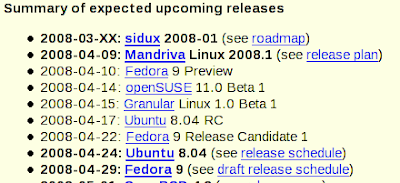
April is going to be the shootout month for leading linux distributions. With PCLinuxOS 2008 scheduled for release there are other three major distributions in the lineup with much promise, they are: Sidux 2008-1, Mandriva 2008.1 Spring, Fedora 9 and Ubuntu 8.04 LTS.

Mandriva has actually spelled its magic with 2008 version and its 2008.1 Spring edition is supposed to come with OpenOffice split packages, better hardware support and a better look-n-feel. OO.o split packaging is awaited by many. It will give users the freedom to install/remove oobase, oomath, oocalc, ooimpress, oodraw or any other packages, so the user will have a faster OO.o with just the required packages.

Sidux, Fedora and Ubuntu are giving a head-on fight with Mandriva. And PCLinuxOS is supposed to come with wait-n-watch philosophy. It will get the best features of them all hence the release may be little late, may be in this Month or the Next.

Ubuntu 8.04 and Fedora 9 are also special in many respects. It will be a long-term support release for Ubuntu, where as Fedora 9 is slated to go for RHEL 6.

So, wait and watch.

Saturday, March 29, 2008

Why do PCLinuxOS and other Desktop Distros sit only on 2% of the desktops and notebooks?

pclinuxos adoptionPCLinuxOS, Ubuntu, Mint and Mepis proponents often claim that desktop linux has improved a lot in last 5 years that it has become much user-friendly and productive. But do you still realize why desktop linux still sits only on 2% of the systems. There are many views as to what keeps people away from using even so user-friendly desktop distro such as PCLinuxOS. Some say Linux is still not ready for desktop for lack of mature software, loose desktop integration, lack of support, multiplicity of standards.... and many more....

Do these views justify the stagnant adoption of desktop linux? Well they do to some extent and all of them really don't matter that much. So what is that big roadblock?

It's pirated microsoft in developing countries that really pose a threat to deployment of Linux. Top models of major Desktop/Laptop brands come with original copies of MS windows preinstalled but still some lesser known brands and base models of top brands come with PCDOS or FreeDOS. The sales of such models and brands actually outnumber those who come Windows preinstalled. As soon as those low (base) model desktops/laptops are shipped out from the vendor/retailer the user loads a pirated copy of windows xp or vista. Because pirated XP and Vista are available for just Rs. 40, it means less than $1. So who is going to take the pain of choosing a desktop linux distro, installing and configuring it if needed. The same is true with 99% of assembled PCs. Rarely ever anybody purchases a licensed copy of Windows for an assembled PC.

Difference of figures between desktop and laptop sales and microsoft windows sales says that more than 80% of the home users are using pirated copies of windows. And they are happy with it as they don't need the genuine microsoft advantage at all. After all, why any home user will need it anyway, he/she just uses the box for word processing, web browsing and some multimedia works. Though windows sucks them for viruses and many other problems, it's not a big deal. It just takes another 30 minutes to do a fresh install.

It seems that Microsoft is indifferent towards piracy. Because this piracy is a blessing in disguise because it helps maintaining MS dominance in desktop market.

Sunday, March 23, 2008

PCLinuxOS Gnome 2008 Released

Good news for those looking for PCLinuxOS 2008. However, it is not the official PCLinuxOS 2008 full release, rather it's a gnome remaster that has the same kernel (kernel 2.6.22.15.tex3) which is supposed to come with the official full release.

pclinuxos gnome 2008 screenshot

I am blogging this post from the latest gnome remaster of pclinuxos. I had tried its last version also, and I would highly recommend anybody even if he/she is happy with that, because the latest pclos gnome remaster is fast, beautiful and more polished.

With its last version I had a few problems related to display and system responsiveness. This edition has taken special care to fix those. It has included brasero as the default cd/dvd burning tool, which is a good step forward. Pclos gnome 2008 also readily detects intel gma 965 (x3100) graphics cards and latest broadcom wireless ethernet cards.

I have just one complain to Linuxgator regarding its office apps. It still has that abiword and gnumeric whereas it could have made some space for openoffice after removing those compiz and few less used apps.

Download the latest gnome remaster:

(666MB) MD5

Sunday, March 2, 2008

My Favourite Apps on PCLinuxOS Gnome 2008

Sometimes I think what keeps me stick to PCLinuxOS, while there are many popular desktop linux distributions around. Why can't I make Ubuntu, Mandriva or Fedora a mainstay on my notebook even though there are many more desktop applications available for them? Why could not I keep any of them on my notebook for a day or two, even though they have a bigger community behind them?

The reason is - Tex and the Ripper Gang have not only gifted me a great OS, but a good number of applications that just work. The applications compiled by Tex and his Gang alway work. For example, WinFF, I had tried WinFF in Mandriva 2008 and Ubuntu 7.10. And I had a bad impression of the app until I tried it on PCLinuxOS. Oh! My God, it's a great program to meet anytype of video conversion. There are so many other instances where only the applications packaged by Tex and available on PCLinuxOS gives a better experience than any other in the linux world. Perhaps, Tex puts his heart and soul into packaging good applications. Perhaps, they are godly creations!

My PCLinuxOS desktop
click on the image to see its true size

My PCLinuxOS Desktop: No multiple windows, No icon clutter on a pure Linsta look.

xmms my favourite music player on pclinuxos
click on the image to see its true size

The good old music player for Linux and my favourite. I like it for its speed and simplicity.

Wether pclinuxos or windows xp, vlc is my darling video player
click on the image to see its true size

Oh! When I am in a doubt if a video will play on my system I play it on VLC and it goes. VLC liberated freedom to play any video despite the proprietary restrictions.

my next favourite media player on pclinuxos
click on the image to see its true size

Mplayer, my next favourite media player.

aiksaurus is always active on my pclinuxos
click on the image to see its true size

Aiksaurus, the best small thesaurus on PCLinuxOS

wordnet, my oxford dictionary replacement on pclinuxos
click on the image to see its true size

Wordnet in fav word lookup program on pclinuxos

oowriter the iconic word processor on wordnet
click on the image to see its true size

I had in the impression that OOWriter is slow in comparison to MS Word. But after shedding multiple language support, java support, gallery and some rarely used addons I found it very much responsive. I also embedded wordnet with oowriter to make it a writer's possession.

nvu on pclinux is similar to dreamweaver in xp
click on the image to see its true size

Running Nvu in pclinuxos is better than running Dreamweaver in XP

audacity on pclinuxos
click on the image to see its true size

Audacity does those audio correction for me. I don't need a more powerful applications.

blender blends with my requirement on pclinuxos
click on the image to see its true size

Blender is good for creating simple 3d models.

f4l is flash for my pclinuxos
click on the image to see its true size

F4L is not as powerful as Adobe Flash. But how many of us work on Flash and action scripts and develop a complete CD/DVD presentation. If you are not a Graphic Designer and you just want create simple banners and animations, F4L is for you. I am happy with it.

gcalculator on pclinuxos gnome
click on the image to see its true size

I need this app every now and then. Need I say anything about it?

gimp 2.4.4 on pclinuxos
click on the image to see its true size

The best opensource image editor that gets better with each new version.

inkscape on pclinuxos
click on the image to see its true size

Inkscape is the answer to Windows based CorelDraw

isomaster, tiny iso editor on pclinuxos
click on the image to see its true size

When it comes to edit iso files, isomaster is my favourite app.

nautilus cd/dvd burner on pclinuxos gnome
click on the image to see its true size

No more gnomebaker, no brasero, no gcombust. Nautilus cd/dvd burner works the best on my pclinuxos gnome remaster.

pidgin is the best small im on pclinuxos gnome
click on the image to see its true size

Gaim got better with Pidgin and it's on my pclinuxos always.

skype on my pclinuxos
click on the image to see its true size

I love skype for its voice quality and features. It's there always on my PCLinuxOS.

transmission is the best p2p client for pclinuxos gnome remaster
click on the image to see its true size

I have always liked transmission on my PCLinuxOS Gnome Remaster because it's small, simple, fast and flawless.

recordmydesktop, the best screen cast program on pclinuxos gnome
click on the image to see its true size

Recordmydesktop generates optimized ogg video of my screencast on PCLinuxOS. It does better work than most of the non-free screen cast programs.

very good download manager
click on the image to see its true size

I came across wxDownloadfast, don't quite remember where, but it's great download manager. It's fast and light, and runs on pclinuxos quite well.

winff the best video converter on pclinuxos
click on the image to see its true size

WinFF does the best video conversion on top of ffmpeg. Two thumbs up for its power and versatility.

best cli typing tutor on pclinuxos
click on the image to see its true size

My wife's favourite typing tutor on PCLinuxOS gnome.

rxvt, my favourite tex terminal on pclinuxos
click on the image to see its true size

Rxvt, my best text terminal. It is a tiny and fast.
(The screenshot displays my grub menu. My system doesn't stop at boot options. It boot boots just like Windows XP, it's hidden from ther user)

I run bare minimum services on my pclinuxos
click on the image to see its true size

I run bare minimum services on my pclinuxos. The result, my system runs at a blazing speed. If you are a pclinuxos home user you can also reduce your services for faster bootup and better response.

pclinxuos gnome - optimized initiation
click on the image to see its true size

I have optimized my inittab for better bootup. You can do the similar changes to your pclinuxos if you are a home user.

How about this