Tuesday, March 22, 2011

Is CentOS Dieing?

There must be serious issues within the project though the core personnel don't acknowledge it!

RHEL 6 was released on 2010-11-10, RHEL 5.6 was released on 2011-01-13 and RHEL 6.1 Beta was released on 2011-03-22. Both Scientific Linux and OEL have released v. 5.6 and 6. CentOS counterparts are nowhere to be found. With every date slipping seems CentOS 6 will see the light of the day sometime in May 2011. Probably Redhat will push 6.1 through the door by then. The long delay (almost 5 months) in bringing out v.6 has triggered some black-comedy posts in the CentOS fora such as : "The 'C' in CEntOS means 'Closed'!" and "Things are getting from EL6 to HELL6.

I don't know why such annoying delay in rebuilding packages from a stable upstream. CentOS 6.0 development is not development proper, but the rebuilding of some hundreds of packages. CentOS has an easier job of doing a release. Projects such as Debian and FreeBSD do a heck of a lot more. It's multiple times more difficult to release a new FreeBSD or Debian than it is to do a rebuild. Wonder how long it would take to rebuild the system if CentOS base system would have the number of packages that Debian has. Both Oracle and Scientific Linux also do a lot more than just debranding and recompiling, but they don't slip the dates like CentOS, and if at all they do, there's due communication for the same.

CentOS now follows what? SL, OEL? Why this late-to-the-party strategy? What is the aim of CentOS? A simple technical satisfaction? If so, it should be out of the way and drop that Enterprise tag. The lack of communication regarding the state of development and this unprecedented delay in the major releases steadily turning it into a hobbyst's distribution. The lack of communication also seems like a deliberate decision to keep users in the dark. They should come up and say users that the project is closing and that they should look for alternatives, preferably Scientific Linux. CentOS had promised (though, of late some centos guys deny) regular updates within 72 hours, security errata with BugFix and Enhancement errata within 2 weeks after more rigorous testing. Now the delay is serious enough!

There's apprehension that Centos is probably not going to survive for long. The developer group is really too small and the method that they use to prepare and subsequently deploy Centos is too slow. Scientific Linux and OEL are infinitely superior in every way (paid developers, planned schedules, better communication, etc). IMO, Scientific Linux is no less stable, it's just that CentOS has gained the reputation for the earlier timely and good releases. And there's this inertia of change on the mindshare. However, the recent irregularity will definitely force a lot of CentOS user to move to Scientific Linux, and it's for good.

Saturday, November 13, 2010

RHEL 6 has Nothing Noteworthy for Home Desktops

Red Hat Enterprise Linux 6 Final shows up on 10th November 2010, almost 44 months after its previous major release (RHEL 5 was released on 14th March 2007). But at the time it came, it's already bit obsolete for desktop use. Of course, desktop has never been a sweetpot for Red Hat. But was it really tarnishing it's rock-stability by riding a few versions up on some packages? What was holding RH back from appropriating KDE 4.5 series, or for that matter jumping to GNOME 2.32? Sure, it must have backported some goodies from Fedora 13 and 14, but they work underneath, the worry is that it'll put on these DEs till, say, 7 to 10 years. Moreover, KDE has undergone many improvements from its 4.3 to 4.5 versions. Same can be said of GNOME. Debian Squeeze's desktop-readyness (if you consider the DE, system utilities and application software) is more modern compared to Red Hat. Red Hat yet again, indirectly proved that it's not for desktops.

Some enterprise stuff are also bit obsolete. For example, the perl and python versions of this major release are at least a year old. The rock solid redhat stability also leans more towards servers. Though it aims at customers who don't care the version increments but a lot of bug fixes, it still cherry picks bug-fixes. So moving to a later point-release doesn't always solve a problem. For example the boot-delay bug (very important if you value desktops) that crept into RHEL 5.3 is still there in the latest 5.6 beta and it will probably remain in 5.8 (if it ever comes). You can expect similar glitches in RHEL 6.

Thursday, November 4, 2010

Why I Prefer Debian to RHEL: Top 5 Reasons


RHEL still remains the fodder for all those academicians and enterprises. For example, if you want pursue a course in Linux you are advised to do RHEL cos that's what enterprises care. Gradually they advise others to learn/use RHEL even for home desktops. Perhaps, that's why RHEL was synonymous with Linux some years back till Ubuntu made inroads with a bang.

Given desktop usage, I'd choose Debian over RHEL (I'd play dumb if you ask me about servers, I'm still learning), anytime. Why?

#1 Debian does not have those enterprise crap

Install any version of RHEL and it's contemporary Debian counterpart on dual-booted desktop. Maintain a comparable set of applications. Compare both the installations. You will wonder why RHEL includes those enterprise crap on a desktop installation.

#2 Debian cares for desktop users

Server people once make an installation and forget for years. But the story is different on desktops. It shows RHEL never really cared for desktops. It never makes any significant work to improve boot and performance of a desktop system. Generally, the bugs that matters to a home desktop is pushed down the priority list for years and years. Here is one such case.

#3 Debian though cares stability pushes updates more quickly than Red Hat

Most often Debian and RHEL will end up in a tie if they battle for stability. But Debian is very prompt when it comes to major releases. Look back, RHEL 5 was released in March 2007 around the same time of Debian 4 (Etch). Meanwhile, Debian has released Debian 5 (Lenny) and frozen Debian 6 (Squeeze) which may go gold later this year. Any answer from RHEL? It may take almost 4 years for RHEL to release the next major version. Though RHEL frequently churns point releases it shows enough aging compared to Debian.

#4 Package management is lot easier on Debian

Compare yum, pirut or yumex with aptitude, apt-get or synaptic, you will always find *apt* a lot faster/simpler and superior to the *yum*y stuff. Besides, kernel recompiling and compiling packages from source are a lot easier in Debian than in RHEL, though, with 30000 packages in debian repo you will probably never require it. RHEL is more of a closed source OS in an opensource ecosystem. Taming it to make desktop-friendly will force you to an error-land.

#5 Debian is definitely less of a resource-hog and much snappier than RHEL

I've tested the 2nd Beta of RHEL6 and compared it with the Debian testing (squeeze). Those looking for a proof can compare RHEL with Mintified Debian Squeeze. Needless to say, Debian revolves circles around RHEL when it comes to boot speed and system responsiveness, with less memory footprint.

Friday, October 29, 2010

Squeezing Linux Mint Debian Edition

Linux Mint Debian Edition (LMDE) is awesome! Based on Debian Testing it is a rolling distro. That means if you are running LMDE you will always have an up-to-date system running, and as the saying and experiences go, Debian testing base is more stable than the so called final/stable releases of most other distros. But if you are a stability freak like me, you can make your Linux Mint Debian stable by pointing the apt sources.lst to squeeze. This ways you won't have to install point updates of applications every now and then. You will always have the most stable and workable system for quite a long period, till squeeze becomes obsolete. Here is how I did it.

1. Download and install Linux Mint Debian Edition now. Why now? Because debian testing (on which the current LMDE is based) is now frozen. Who knows when squeeze will be redeemed stable and LMDE install will start receiving truck loads of updates from next testing base - wheezy . And once you are inside the next testing base it will be really tough to regress the packages to the stable. So it’s better to install LMDE before debian testing package base changes.

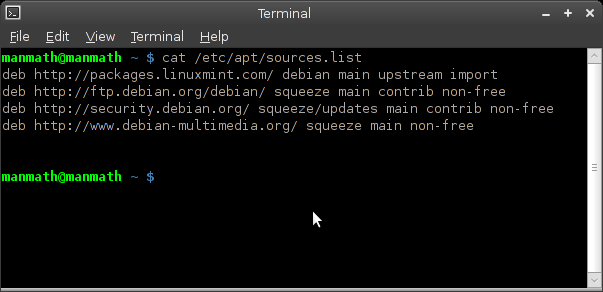
2. Edit your /etc/apt/sources.list file to point to "squeeze" instead of "testing" after the installation. Pointing to "lenny" or "stable" at this point of time will not work because apt can't downgrade packages. Click on the image below to have look at my sources.list. All you need to do is to replace all the instances of "testing" with "squeeze".


3. Upgrade your system to sync it with the upcoming Debian stable. Open a terminal and issue the following command as a root user.

apt-get update && apt-get dist-upgrade -yd

4. Now you should be OK with the debian stable version of LMDE. If you are still paranoiac about system stability and sanity (to make LMDE as close to pure Debian Squeeze as possible) you can uninstall as much minty tools and/or replace them with their pure-debian counterparts as possible. But be cautious not to remove some critical packages. Click on the image below to have a look at the minty packages that my system still retains.


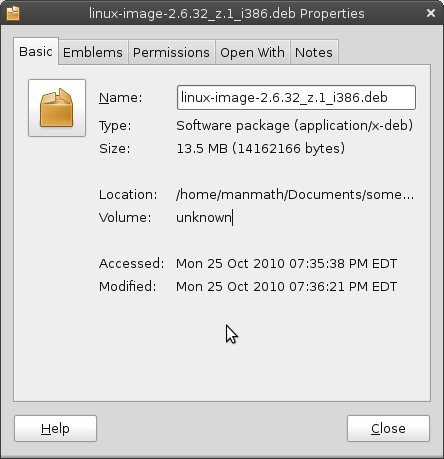
5. Roll out your own kernel. Don't panic, compiling your own kernel is not that difficult on a debian based system. Here is a short guide to do just that. Remember to give a custom version no. to your kernel-image while building the same. I have given a custom "z.1" suiting my fancy. My fresh build kernel package is linux-image-2.6.32_z.1_i386.deb. Custom versioning helps me avoid updating my kernel. Once I've a perfect kernel working I don't want it to update. Why fix a thing if it's not broken! Besides, like you, I as a desktop user, would like to customize my kernel suiting to desktop and my peculiar processor and other devices. Default debian kernel is good but it still leans more towards servers. Compiling your own kernel is necessary if you want to make the best of your desktop.


Have a look at my squeezed Linux Mint Debian edition. It's light as a feather - runs with 60MB memory footprint. It's rock solid and hell fast, and it will remain the same till I deliberately break it someday.

Saturday, October 9, 2010

iBall NetTop 009 Cabinet - Flaw in the Design!


For long I was in the opinion that iBall is a leader/pioneer in IT products. My last encounter with its NetTop 009 (for my Intel D410PT board) proved that false in many ways, most important ones among them are: shoddy product quality and dumb customer support.

Here are the specs:

  • 5.25 Inch Bays : 1 x 5.25 Inch Normal DVD Writer / ODD Bay
  • 3.5 Inch Bays : 1 x 3.5 Inch Normal Hard Disk Drive Bay
  • Motherboard Form Factors : ATOM based Mini-ITX Motherboards
  • Front USB Ports : 2 x USB 2.0 Ports
  • Front Audio Ports : HD Audio MIC and Speaker Out
  • Cooling Fans : 1 x 4cm Rear Cooling Fan
  • Extra Cooling Fan Provision : 1 x 4cm Front Cooling Fan Provision
  • Power Supply : iBall STX 180-153 (24pin-150W) SMPS
  • Chassis Type : Mini-ITX Chassis
  • Available Colours : Black Piano Finish
  • Dimensions : 102 x 316 x 278mm (HxWxD)

The company has launched first ever (in India) mini-ITX cabinet specifically for mini-ITX motherboards with integrated atom processors. This tiny cabinet was a godsend for the first generation of Intel essential boards (D945GCLF and D945GCLF2) with Atom Diamondville processors – Atom 230 (uni-core) and Atom 330 (dual-core). The marriage of those Intel essential boards with iBall nettop 009 is blissful because both were noisy. Intel was just making into low-power internet-oriented chips keeping price its major USP. The result was a combo of low on power-n-performance cpu (atom 230 and 330), high on power D945GC chipset and high on noise board fan. Then came this cabinet iBall NetTop 009.

Competition became fierce with VIA's venture with its nano series processors. Intel made head-on innovation on its atom platform. The result was the second generation (Pine View series) of atom processors (D410 and D510) and essential boards (D410PT and D510MU). This time the focus was for a cool-n-quieter experience (fanless and passive cooling support) and less power-usage (NM10 chipset). But iBall still kept on pushing its NetTop 009 cabinet with a noisy rear fan. This cabinet kills the Intel touted experience of quieter performance and low power consumption. Its rear and SMPS fans are enough to kill the show of quietness and power consumption. I doubt the rear fan and SMPS must be generating more power overhead than the board and processor. The company could have come up with a fanless PSU (something like picoPSU) and/or a quieter and better-quality rear fan.

Tragedy in Design:

  1. SMPS makes the overall environment hotter than it would be with a fanless PSU.
  2. Rear fan and SMPS fan create noise in the otherwise completely silent board and cpu.
  3. While atom platform tries to save power watt by watt, the extra fan and traditional SMPS kill the attempt by actually consuming more power. Again, a fanless PSU and cabinet would have resulted in much lesser power consumption.
  4. The SMPS draws cooler air from outside and throws hot air inside. The rear fan frantically likes to keep things cool and cries.

Dumb Service Center:

I don't want the Intel D410PT board inside iBall NetTop 009 to do any herculean task. Most probably it will lie on a rack as a headless file server powered by CentOS or Debian. However, in a full AC environment it would have been great if it created no noise. After doing some benchmarks on the board I wanted to make this Cabinet silent and drove to iBall service center at Ashok Bhavan, Nehru Place. But lo! They pretended to be dumb. All of them said that a cabinet can't be quieter. I told that there is a lot of difference in purpose between traditional fully-powered desktops and fanless low-powered nettops. They did not move either. Some at the center frowned to my question regarding a fanless PSU solution; according to them there is no such thing.

Wake up iBall, lest others will move their eye balls away from you.

Saturday, September 25, 2010

PCLinuxOS Progresses Undeterred


If computer is your hobby, you will, sooner or later, run into Linux. Cos only Linux (not Mac, Windows or any other OS) gives you that power to tweak/tinker, virtually every bit and piece of the OS. That's why there are so many distributions, so many forks, spins, respins, and multitude of application software for a single task. No surprise, many hobbyists come, wander in the linux world, but a few really stick to it, rest go. Cos? Not all the distributions are polished, stable, easy and powerful. Most often sticking to linux depends on hitting a good no-nonsense distribution (like PCLinuxOS, Mint or Mepis) at the first chance. IMO, PCLinuxOS tops the list of distros that care for new-converts.

PCLinuxOS is one that compelled me to stick to Linux. Of course, I'd been exposed to linux from RedHat 5, but that was a compulsion from the then employer. Putting Linux on my home desktop started with PCLinuxOS, way back in 2005. A lot has been changed ever since: numerous desktop wannabe distributions have come up, kernel/userland has gone through a sea change, GNU applications have seen many increments. Similarly, PCLinuxOS development and participation have undergone much changes. First mis-considered as a Mandriva fork, PCLinuxOS has developed a personality of its own. Some devs/projects (granular, pclosbe, intux, sam, unity) have forked away. Some alleged the way PCLinuxOS develops, saying it dictatorship managed, orthodox.. bla...bla... But seems all that have happened for good. It's become unique; taken the best pieces from the linux world and put them together like no one has done before.

My Linux love started with PCLinuxOS though these days I dabble more with Debian, CentOS and SuSe. It's official compulsion. But when it comes to recommending a distro to someone interested in Linux I utter "PCLinuxOS", it comes to my tongue as a reflex. I am so used to it!

Well, enough prophesy. Now onto something current with it. I have started liking PCLinuxOS ever more for a few reasons. They are:

#1 Multiple Flavors: KDE is the flagship and default desktop environment for PCLinuxOS. And I am happy to see that though it lags (for good) a few numbers back in kernel and userland, it keeps abreast with the KDE4 increments. The latest quarterly update was a joyride. Previously skeptic on KDE4 moves, I fell for it on its 4.5.1 iteration. What tremendous amount of efforts gone into making it! In addition to KDE, there are half a dozen of variants including gnome and lxde. Seems they are also getting enough polishing. If you like PCLinuxOS, desktop environment is not a matter of concern. Download a variant you like or pull in the meta package of that DE from pclinuxos repo. Either way you will have success. Rest assured, you won't face any glitches that you generally expect from a so called bleeding edge desktop.

#2 PCLinuxOS magazine: These days PCLinuxOS has bringing out its monthly magazine regularly religiously. I am sure it won't win a FOSS award for the literature. But it has a lot to make us mortals happy and engaged in Linux. The mag has a systematic approach to teach newbies essential commandline magic, use/management of popular desktop environments and developments specific to PCLinuxOS. It has those fun stuff elements also that you expect from a community or school magazine.

#3 Development Decisions and Friendly Forum: PCLinuxOS's sheer care for consumer desktop becomes evident from its development and discussions. Keeping close to kde4 development, choosing bfs over cfs, and listening to members' (at times packaging for them) queries are a few of the activities that prove it. It may not be the best FOSS distro.. It may not punch opensource nouvau... It may not jump to the nascent kernel, but it makes sure that your piece of graphics, sound, printer or wireless device work as painlessly as possible. It might never have shown off the reflected-glory of banning non-free bytes, but it makes sure that you won't waste your precious time fighting with your hardware.

Sunday, September 19, 2010

Linux: How to Replace Grub2 with Grub Legacy

RHEL 6 Beta 2 is still pushing grub legacy forward. No doubt it's going to stay with RHEL for some couple of years more. It somehow gives a little hint that grub2 is still little too complicated and experimental. However, if you are not that panicky Redhat/Centos person, you will get grub2 imposed upon you. Because the the rest of the distributions in Linux world has already been moved to grub2 land of boot configuration.

If you are one among those looking to replace grub2 with grub legacy, follow the few steps to achieve just that. The steps here pertain to Debian Testing, Ubuntu, Mint and other Debian/Ubuntu derivatives. You might have to change the steps as per your special distribution and its packaging system.

  • Open a terminal, be the super user - sudo su if you are using Ubuntu and the likes, su for pure debian and the rest
  • Remove grub2 - apt-get remove grub-pc
  • Instal grub legacy - apt-get install grub
  • Install grub in MBR or wherever you think appropriate for your condition - grub-install /dev/sdx (replace "x" with appropriate character as per your partition tree)
  • Update grub legacy - update-grub

Have a look at my menu.lst (click on the screenshot below) file in grub legacy on Ubuntu Lucid setup. Is not it simple and sane?

Saturday, September 18, 2010

Red Hat Certification for RHEL 6

Red Hat Hat has already rolled out two betas of its next major enterprise linux - RHEL6. It's been very late - almost twice the time (18-28 months) mentioned in RHEL 5 product document. It will still take considerably time pushing the release date to the end of 2010 or the beginning of 2011. Because rolling out a release is not the only thing, the big "E" in RHEL demands for certification, and Red Hat is pursuing certification for its next major Linux OS and virtualization.

Red Hat is paving the way for government agencies and enterprises to use its new technology to create secure, virtualized IT environments (KVM) and private clouds. The company is also into an agreement with Atsec information security to certify Red Hat Enterprise Linux 6 under Common Criteria at Evaluation Assurance Level 4. The certification covers the KVM hypervisor that enables an OS to run virtually without the need for a physical server, reducing the number of energy resources a data center requires. It also takes SELinux along with virtulization to ensure virtual resources run in separate containers.

Red Hat already has achieved Common Criteria certification 13 different times on four different Linux platforms. Alongside acquiring those certifications, Red Hat has also a lot to do in relation to RHEL 6 training, deployment and hardware compliance with many vendors and partners.

Saturday, September 11, 2010

Linux, Google, Android and Mobile Devices

Based on the Linux kernel and GNU software, Android is the most popular (33% of all units sold) mobile (smartphone) operating system of our time. developed by Google and is based on the Linux kernel and GNU software.

Under the Hood

Linux might still be a playground for hobbysts. But linux-drived software are going places. Deep inside Android software stack consists of Java applications on top of Java core libraries running on a Dalvik virtual machine featuring JIT compilation. Among others android has put together the surface manager, OpenCore, SQLite, OpenGL ES 2.0, WebKit, SGL, SSL and Bionic libc, very well. In all it consists of 12 million lines of code - 3 million lines of XML, 2.8 million lines of C, 2.1 million lines of Java, and 1.75 million lines of C++.

The Reception

With a decent beginning 2007, Android has attracted maximum attention from users, mobile handset manufacturers and software developers. The reception of Android has been the warmest. Till date there are 70,000 apps approved for it and some 100,000 have been submitted. Open Handset Alliance, a consortium of 78 companies (including Texas Instruments, Broadcom Corporation, Google, HTC, Intel, LG, Marvell Technology Group, Motorola, Nvidia, Qualcomm, Samsung Electronics, Sprint Nextel, T-Mobile, PacketVideo, ARM Holdings, Atheros Communications, Asustek Computer Inc, Garmin Ltd, Softbank, Sony Ericsson, Toshiba Corp and Vodafone) is devoted to advancing open standards for mobile devices through Android.

Sunday, September 5, 2010

How to Install/Run Turbo C/C++ IDE on Linux

Borland Turbo C/C++ IDE is not the best, not at all recommended on production floor. But it's still the mainstay in majority of schools and colleges, especially in India. GCC/G++ on linux is better for hardcore programming. However, from a beginner's perspective, it lacks those nice contextual buttons/menus and interface of Borland Turbo C/C++ IDE.

Thanks Dosbox! You can install/run Turbo C/C++ IDE on linux too. Just follow these steps.

#1 Install Dosbox

Installing dosbox is a child's play.
If you are running Debian or Ubuntu, open the terminal as a root user and enter:
apt-get install dosbox

If you are running Red Hat, Centos or Fedora, open the terminal as root user and enter:
yum install dosbox

#2 Download Turbo C/C++ IDE

Google a bit, and you will easily find Turbo C installers for Windows/DOS in a zipped archive format.

#3 Extract Turbo C/C++ Archive in your home (~) directory

#4 Run (Alt+F2) Dosbox or open dosbox from programs menu (it sits generally under Applications > Games)

#5 Mount your home (~) in root


Inside dosbox type:
mount c ~


#6 Move to the extracted "Turbo C" directory


Type:
c:
cd TURBOC~2


then:
install

It will start the setup. Follow the ncursed instructions to install as shown in the screenshots below.


Just press Enter to continue installation.


Enter C in the "Enter the source drive to use:" option.


Accept defaults and Press F9.


Press any key to continue with the installation


Turbo C/C++ IDE Installation is complete

#7 Running Turbo C/C++ on Linux

Run/open dosbox. Enter the following one by one in the dosbox terminal


mount c ~
c:
cd tc\bin
tc.exe


Turbo C is running on Linux

How about this