Monday, May 30, 2011
Linux Kernel 3.0 is Not Far Away
Linux kernel 2.6.39 just released, much earlier than expected. Reasons?
It's coming of age after releasing 39 updates to kernel 2.6 line. The Linux 2.6 kernel series is now on its way to its 40th release in the past seven years of development. Linux 2.4 series had about 24 releases prior to Linux 2.6.0 being released and the 2.4 series as of today is up to Linux 2.4.39. And Linus (alongwith the community) is getting ready for the next gen kernel - 3.0. However, 2.6 series will still get patches and updates as still does 2.4 line.
Is it just a change in the versioning scheme or are there much under the hood? Well, Jump from 2.4 to 2.6 line had some striking features, the same will happen now. Most importantly, kernel 3.0 will remove some old cruft it gathered in its life of, say, roughly 20 years.
This jump in versioning won't reflect in the package list of enterprise linux distributions such as Red Hat (and its clones) who are adamant when it comes to security and stability. That means Red Hat, CentOS, Oracle and Scientific will stick to 2.6 series for roughly a decade, and will backport only some select features.
Thursday, May 19, 2011
How to Get Rid of "Unlock Keyring" Message in Linux after You Changed Login Password
I've been running Linux Mint Julia for a quite a long time now. Only yesterday I updated the entire system (including kernel, firefox, chromium, openoffice, pidgin and all that). Also changed my Login password due to some security reasons. No ugly surprises. No lag in performance. But everytime I started chromium browser it popped up a "Login keyring" message that read "Enter password to unlock your login keyring".
It seems Seahorse uses the login password as master password to unlock its passphrases. Sadly, when the user changes the password, it is not updated to Seahorse and that "Login keyring" popup comes up.
Visited both Mint and Ubuntu fora for a fix. All the solutions there from were pointing to Seahorse (two items in System >> Preferences: Passwords and Encryption Keys, and Encryption and Keyrings).
However, the easiest and unfailing fix to avoid this message it is to remove the ~/.gnome2/keyrings/login.keyring.
Saturday, May 14, 2011
Preparing a Bootable USB to Install Windows 7 on Asus 1215B
Asus 1215B perhaps put the components together around Fusion APU the best way. Great design, brushed aluminum finish and quality components. However, with 12" form factor it could not house an optical drive. It's the typical problem of notebooks with sizes below 13". So, if the product ships without any OS preinstalled you are left with just two options - 1. try installing an OS using a borrowed/bought USB optical drive, and 2. prepare a bootable USB with the OS of your choice.
I don't have a USB optical drive, and none around me has the same. Bootable USB was the way to go. Had it been installing Linux I could have done that either using plain dd command or unetbootin tool. But from what I see this gadget still doesn't have out-of-the-box support in Linux land. I am sure things will improve with kernel 2.6.38. Meanwhile Windows 7 is the best OS for this notebook. But, creating a bootable Windows 7 usb on a linux machine demands you to get dirty with the commandline.
I did try packing Windows 7 iso image into a USB drive using dd (the most common disk copy method, what I did was "dd if=/home/msahu/Window7Ult.iso of=/dev/sdb1"). The installation started but got stuck mid-way. Then I followed the old tried/tested formula, and it worked like a charm. Here is the rundown of the same:
1. blanked the usb drive
dd if=/dev/zero of=/dev/sdb1 bs=446 count=1
2. ran fdisk
fdisk /dev/sdb1
3. removed all the partition of that usb drive, created just one primary partition and turned on the boot flag
4. converted the usb filesystem to ntfs
mkfs.ntfs /dev/sdb1
5. finally extracted the contents of Windows 7 iso image to the usb drive and booted Asus 1215B using that drive
Saturday, April 23, 2011
Idiot Indian IT Sales Guys on Loose
Territory: Delhi's much hyped PC Hardware market, Nehru Place
Result: Meeting the dumbest of IT sales representatives
Indian IT force is growing, but the PC Hardware market is definitely not coping with that pace. It's still kind of mom-and-pop culture. I just came back from Nehru Place, tauted as the biggest market for IT products in India. Visited the outlets of big brands - Dell, HP, Lenovo, HCL, Acer, and a few shoddy brands such as Chirag Greenputers, eSys and Intex. Everywhere I found the representatives following the prospective customers and trying to throw their USPs, sometimes those USPs have nothing unique about them. Paradox!
Visit to Chirag computers (or greenputers, as the company calls it) was a laugh riot. A sales girl came up and handed me a brochure. Before she could start throwing tantrums I started catapulting her, "What's so green about your greenputers?". She went on and on..."Our computers save energy. They come with Windows 7 pre-installed and integrated automatic sleep modes preconfigured. Hence, use less energy. Each of our products has got Energy Star certification. Our computers have much storage space to save your documents that you won't need to maintain hard copies, you'll save on paper....", and she was confident throughout.
My next reaction, "WTF! You are such a beautiful girl, but why are you throwing such dumb points. Automatic sleep mode is neither unique to your products, nor a unique feature of Windows 7. AFAIK, it's been there since Windows 2000 and the hardware of that time, or before. Besides, computers generally never run out of space due to documents, it's the audio, video and graphics stuff that consume maximum bytes. Moreover, every other hardware manufacturer/assembler sells computers with Windows 7 and spacious hard drives comparable to yours, or sometimes even more. Are your products, in any ways, superior to, or different from, Dell, HP or Lenovo?"
She stood still and I went out.
Next I spotted a bunch of dumb representatives at Lenovo outlet. A suave gentleman told the features and prices of a dozen notebooks on display. "Do you have X120e, it's the one launched 4 months back, it sports an AMD Fusion e350 APU?" That gentleman moved to a group of his fellow representatives for an answer. After a few cross-questioning with that group he came back to me and told, "Lenovo doesn't have any notebook with that model number and there is nothing like such Fusion e350 APU, what's it, a graphics card, chipset, processor...?"
This time I did not utter that "WTF", instead I browsed the official websites of Lenovo and AMD on my tablet. Showed him, not only does that model exist but it's a top seller also. Then, I told him at length about the Fusion series APUs. And also made him understand that world is not restricted to his showroom.
I had similar funny experiences with the guys at Dell, HP and HCL. Most of them were aware of only a few stock phrases such as: Dual Core, i3, i5, i7, Atom, Nvidia, ATi... nothing beyond. All of them are still in the believe that AMD processors produce much heat. Whereas AMD processors that came after Athlon Neo II run much cooler than any of the Intel chips. They looked quite puzzled when I told them that not just AMD and Intel make processors, there are VIA, Cyrix, Tegra and a dozen others...
None I found had the faintest idea about various processor families, chipsets, platforms and the upcoming products. None of them knew any difference between selling computers and potatoes.
This is the situation in Delhi, let's forget about the rest of the country.
BTW, I am going to buy Asus 1215B.
Tuesday, March 22, 2011
Is CentOS Dieing?
There must be serious issues within the project though the core personnel don't acknowledge it!RHEL 6 was released on 2010-11-10, RHEL 5.6 was released on 2011-01-13 and RHEL 6.1 Beta was released on 2011-03-22. Both Scientific Linux and OEL have released v. 5.6 and 6. CentOS counterparts are nowhere to be found. With every date slipping seems CentOS 6 will see the light of the day sometime in May 2011. Probably Redhat will push 6.1 through the door by then. The long delay (almost 5 months) in bringing out v.6 has triggered some black-comedy posts in the CentOS fora such as : "The 'C' in CEntOS means 'Closed'!" and "Things are getting from EL6 to HELL6.
I don't know why such annoying delay in rebuilding packages from a stable upstream. CentOS 6.0 development is not development proper, but the rebuilding of some hundreds of packages. CentOS has an easier job of doing a release. Projects such as Debian and FreeBSD do a heck of a lot more. It's multiple times more difficult to release a new FreeBSD or Debian than it is to do a rebuild. Wonder how long it would take to rebuild the system if CentOS base system would have the number of packages that Debian has. Both Oracle and Scientific Linux also do a lot more than just debranding and recompiling, but they don't slip the dates like CentOS, and if at all they do, there's due communication for the same.
CentOS now follows what? SL, OEL? Why this late-to-the-party strategy? What is the aim of CentOS? A simple technical satisfaction? If so, it should be out of the way and drop that Enterprise tag. The lack of communication regarding the state of development and this unprecedented delay in the major releases steadily turning it into a hobbyst's distribution. The lack of communication also seems like a deliberate decision to keep users in the dark. They should come up and say users that the project is closing and that they should look for alternatives, preferably Scientific Linux. CentOS had promised (though, of late some centos guys deny) regular updates within 72 hours, security errata with BugFix and Enhancement errata within 2 weeks after more rigorous testing. Now the delay is serious enough!
There's apprehension that Centos is probably not going to survive for long. The developer group is really too small and the method that they use to prepare and subsequently deploy Centos is too slow. Scientific Linux and OEL are infinitely superior in every way (paid developers, planned schedules, better communication, etc). IMO, Scientific Linux is no less stable, it's just that CentOS has gained the reputation for the earlier timely and good releases. And there's this inertia of change on the mindshare. However, the recent irregularity will definitely force a lot of CentOS user to move to Scientific Linux, and it's for good.
Saturday, November 13, 2010
RHEL 6 has Nothing Noteworthy for Home Desktops
Some enterprise stuff are also bit obsolete. For example, the perl and python versions of this major release are at least a year old. The rock solid redhat stability also leans more towards servers. Though it aims at customers who don't care the version increments but a lot of bug fixes, it still cherry picks bug-fixes. So moving to a later point-release doesn't always solve a problem. For example the boot-delay bug (very important if you value desktops) that crept into RHEL 5.3 is still there in the latest 5.6 beta and it will probably remain in 5.8 (if it ever comes). You can expect similar glitches in RHEL 6.
Thursday, November 4, 2010
Why I Prefer Debian to RHEL: Top 5 Reasons
RHEL still remains the fodder for all those academicians and enterprises. For example, if you want pursue a course in Linux you are advised to do RHEL cos that's what enterprises care. Gradually they advise others to learn/use RHEL even for home desktops. Perhaps, that's why RHEL was synonymous with Linux some years back till Ubuntu made inroads with a bang.
Given desktop usage, I'd choose Debian over RHEL (I'd play dumb if you ask me about servers, I'm still learning), anytime. Why?
#1 Debian does not have those enterprise crap
Install any version of RHEL and it's contemporary Debian counterpart on dual-booted desktop. Maintain a comparable set of applications. Compare both the installations. You will wonder why RHEL includes those enterprise crap on a desktop installation.
#2 Debian cares for desktop users
Server people once make an installation and forget for years. But the story is different on desktops. It shows RHEL never really cared for desktops. It never makes any significant work to improve boot and performance of a desktop system. Generally, the bugs that matters to a home desktop is pushed down the priority list for years and years. Here is one such case.
#3 Debian though cares stability pushes updates more quickly than Red Hat
Most often Debian and RHEL will end up in a tie if they battle for stability. But Debian is very prompt when it comes to major releases. Look back, RHEL 5 was released in March 2007 around the same time of Debian 4 (Etch). Meanwhile, Debian has released Debian 5 (Lenny) and frozen Debian 6 (Squeeze) which may go gold later this year. Any answer from RHEL? It may take almost 4 years for RHEL to release the next major version. Though RHEL frequently churns point releases it shows enough aging compared to Debian.
#4 Package management is lot easier on Debian
Compare yum, pirut or yumex with aptitude, apt-get or synaptic, you will always find *apt* a lot faster/simpler and superior to the *yum*y stuff. Besides, kernel recompiling and compiling packages from source are a lot easier in Debian than in RHEL, though, with 30000 packages in debian repo you will probably never require it. RHEL is more of a closed source OS in an opensource ecosystem. Taming it to make desktop-friendly will force you to an error-land.
#5 Debian is definitely less of a resource-hog and much snappier than RHEL
I've tested the 2nd Beta of RHEL6 and compared it with the Debian testing (squeeze). Those looking for a proof can compare RHEL with Mintified Debian Squeeze. Needless to say, Debian revolves circles around RHEL when it comes to boot speed and system responsiveness, with less memory footprint.
Friday, October 29, 2010
Squeezing Linux Mint Debian Edition
Linux Mint Debian Edition (LMDE) is awesome! Based on Debian Testing it is a rolling distro. That means if you are running LMDE you will always have an up-to-date system running, and as the saying and experiences go, Debian testing base is more stable than the so called final/stable releases of most other distros. But if you are a stability freak like me, you can make your Linux Mint Debian stable by pointing the apt sources.lst to squeeze. This ways you won't have to install point updates of applications every now and then. You will always have the most stable and workable system for quite a long period, till squeeze becomes obsolete. Here is how I did it.
1. Download and install Linux Mint Debian Edition now. Why now? Because debian testing (on which the current LMDE is based) is now frozen. Who knows when squeeze will be redeemed stable and LMDE install will start receiving truck loads of updates from next testing base - wheezy . And once you are inside the next testing base it will be really tough to regress the packages to the stable. So it’s better to install LMDE before debian testing package base changes.
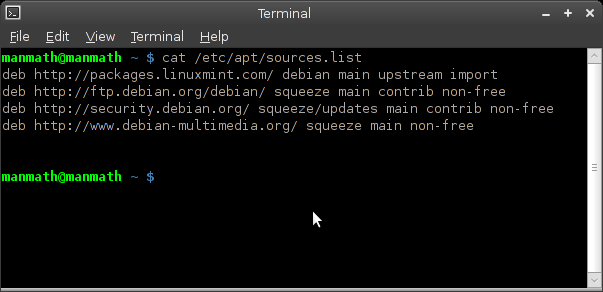
2. Edit your /etc/apt/sources.list file to point to "squeeze" instead of "testing" after the installation. Pointing to "lenny" or "stable" at this point of time will not work because apt can't downgrade packages. Click on the image below to have look at my sources.list. All you need to do is to replace all the instances of "testing" with "squeeze".
3. Upgrade your system to sync it with the upcoming Debian stable. Open a terminal and issue the following command as a root user.
apt-get update && apt-get dist-upgrade -yd
4. Now you should be OK with the debian stable version of LMDE. If you are still paranoiac about system stability and sanity (to make LMDE as close to pure Debian Squeeze as possible) you can uninstall as much minty tools and/or replace them with their pure-debian counterparts as possible. But be cautious not to remove some critical packages. Click on the image below to have a look at the minty packages that my system still retains.
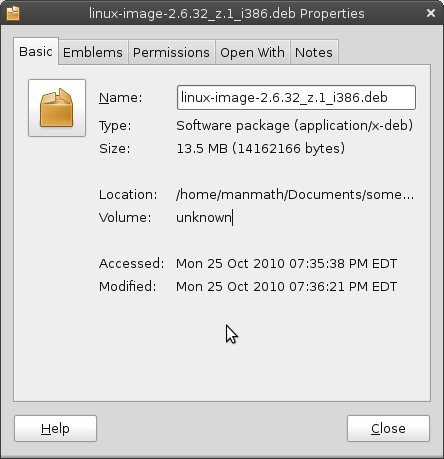
5. Roll out your own kernel. Don't panic, compiling your own kernel is not that difficult on a debian based system. Here is a short guide to do just that. Remember to give a custom version no. to your kernel-image while building the same. I have given a custom "z.1" suiting my fancy. My fresh build kernel package is linux-image-2.6.32_z.1_i386.deb. Custom versioning helps me avoid updating my kernel. Once I've a perfect kernel working I don't want it to update. Why fix a thing if it's not broken! Besides, like you, I as a desktop user, would like to customize my kernel suiting to desktop and my peculiar processor and other devices. Default debian kernel is good but it still leans more towards servers. Compiling your own kernel is necessary if you want to make the best of your desktop.
Have a look at my squeezed Linux Mint Debian edition. It's light as a feather - runs with 60MB memory footprint. It's rock solid and hell fast, and it will remain the same till I deliberately break it someday.
Saturday, October 9, 2010
iBall NetTop 009 Cabinet - Flaw in the Design!
Here are the specs:
- 5.25 Inch Bays : 1 x 5.25 Inch Normal DVD Writer / ODD Bay
- 3.5 Inch Bays : 1 x 3.5 Inch Normal Hard Disk Drive Bay
- Motherboard Form Factors : ATOM based Mini-ITX Motherboards
- Front USB Ports : 2 x USB 2.0 Ports
- Front Audio Ports : HD Audio MIC and Speaker Out
- Cooling Fans : 1 x 4cm Rear Cooling Fan
- Extra Cooling Fan Provision : 1 x 4cm Front Cooling Fan Provision
- Power Supply : iBall STX 180-153 (24pin-150W) SMPS
- Chassis Type : Mini-ITX Chassis
- Available Colours : Black Piano Finish
- Dimensions : 102 x 316 x 278mm (HxWxD)
The company has launched first ever (in India) mini-ITX cabinet specifically for mini-ITX motherboards with integrated atom processors. This tiny cabinet was a godsend for the first generation of Intel essential boards (D945GCLF and D945GCLF2) with Atom Diamondville processors – Atom 230 (uni-core) and Atom 330 (dual-core). The marriage of those Intel essential boards with iBall nettop 009 is blissful because both were noisy. Intel was just making into low-power internet-oriented chips keeping price its major USP. The result was a combo of low on power-n-performance cpu (atom 230 and 330), high on power D945GC chipset and high on noise board fan. Then came this cabinet iBall NetTop 009.
Competition became fierce with VIA's venture with its nano series processors. Intel made head-on innovation on its atom platform. The result was the second generation (Pine View series) of atom processors (D410 and D510) and essential boards (D410PT and D510MU). This time the focus was for a cool-n-quieter experience (fanless and passive cooling support) and less power-usage (NM10 chipset). But iBall still kept on pushing its NetTop 009 cabinet with a noisy rear fan. This cabinet kills the Intel touted experience of quieter performance and low power consumption. Its rear and SMPS fans are enough to kill the show of quietness and power consumption. I doubt the rear fan and SMPS must be generating more power overhead than the board and processor. The company could have come up with a fanless PSU (something like picoPSU) and/or a quieter and better-quality rear fan.
Tragedy in Design:
- SMPS makes the overall environment hotter than it would be with a fanless PSU.
- Rear fan and SMPS fan create noise in the otherwise completely silent board and cpu.
- While atom platform tries to save power watt by watt, the extra fan and traditional SMPS kill the attempt by actually consuming more power. Again, a fanless PSU and cabinet would have resulted in much lesser power consumption.
- The SMPS draws cooler air from outside and throws hot air inside. The rear fan frantically likes to keep things cool and cries.
Dumb Service Center:
I don't want the Intel D410PT board inside iBall NetTop 009 to do any herculean task. Most probably it will lie on a rack as a headless file server powered by CentOS or Debian. However, in a full AC environment it would have been great if it created no noise. After doing some benchmarks on the board I wanted to make this Cabinet silent and drove to iBall service center at Ashok Bhavan, Nehru Place. But lo! They pretended to be dumb. All of them said that a cabinet can't be quieter. I told that there is a lot of difference in purpose between traditional fully-powered desktops and fanless low-powered nettops. They did not move either. Some at the center frowned to my question regarding a fanless PSU solution; according to them there is no such thing.
Wake up iBall, lest others will move their eye balls away from you.
Saturday, September 25, 2010
PCLinuxOS Progresses Undeterred
If computer is your hobby, you will, sooner or later, run into Linux. Cos only Linux (not Mac, Windows or any other OS) gives you that power to tweak/tinker, virtually every bit and piece of the OS. That's why there are so many distributions, so many forks, spins, respins, and multitude of application software for a single task. No surprise, many hobbyists come, wander in the linux world, but a few really stick to it, rest go. Cos? Not all the distributions are polished, stable, easy and powerful. Most often sticking to linux depends on hitting a good no-nonsense distribution (like PCLinuxOS, Mint or Mepis) at the first chance. IMO, PCLinuxOS tops the list of distros that care for new-converts.